Correctly tagging your marketing campaigns is the most important step you can take to measure marketing performance, after setting up a web analytics tool. Without good campaign tagging, marketers cannot know the real impact of their efforts. If you want to understand how much traffic came to your website from …
Web Analytics
How to Create Content Groupings in Google Analytics
Content Grouping in Google Analytics is used to reflect the logical structure of your site. It is typically used to compare and aggregate data within groups you create. It also helps in analysis of your data, as you do not have to deal with messy URL’s, when you try and …
New Autotrack for Google Analytics
If you are using Google Analytics out of the box, without additional event tracking codes or custom configurations, you are missing out on a wealth of good data about what users are doing on your website. Unfortunately, many Google Analytics users do not have the technical know-how or the resources …
Google Analytics’ Smart Goals for AdWords: Better Than No Goals
Every smart marketer knows that you cannot optimize what you cannot measure. We have showed you how to set up goals in Google Analytics to measure conversions on your website, so that you can optimize your marketing efforts. Google has now created Smart Goals for businesses that cannot measure conversions …
Web Analytics Tips: Creating Goals in Google Analytics
Goals are one of the most important parts of Google Analytics and unfortunately, one of the most underutilized. Goals define the most important business objectives (KPIs) for your website. You can then use these KPIs to determine the value of your online marketing campaigns, measure the success of your content …
Content Analysis Report for Google Analytics
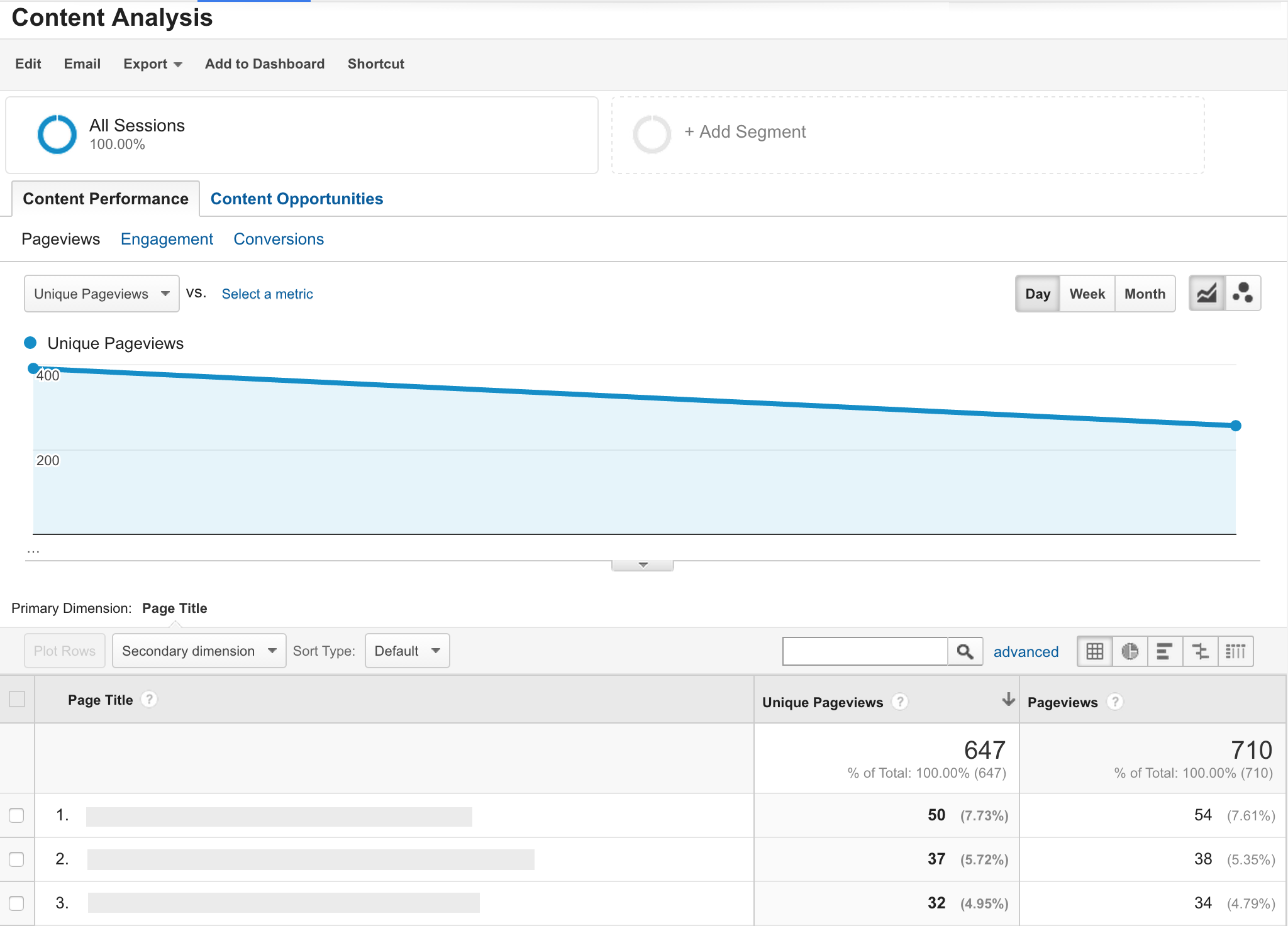
How do you know whether your content strategy is working? How can you measure the performance of the content on your website? We have created a Content Analysis Report that will help you understand the strengths and weaknesses of your content. You can add this custom report to your Google …
Google Analytics Tutorial: Compare the Cost and Performance of Your Online Marketing Channels
Are you wasting your marketing budget on cost-ineffective campaigns? How can you easily compare the performance and costs of your Google Ads, Facebook, Bing, newsletters or other marketing campaigns in one simple report? We have an easy solution for you: upload data about your non-Google campaigns into Google Analytics. This …
How to Set Up Automatic Google Analytics Reports in Google Spreadsheets
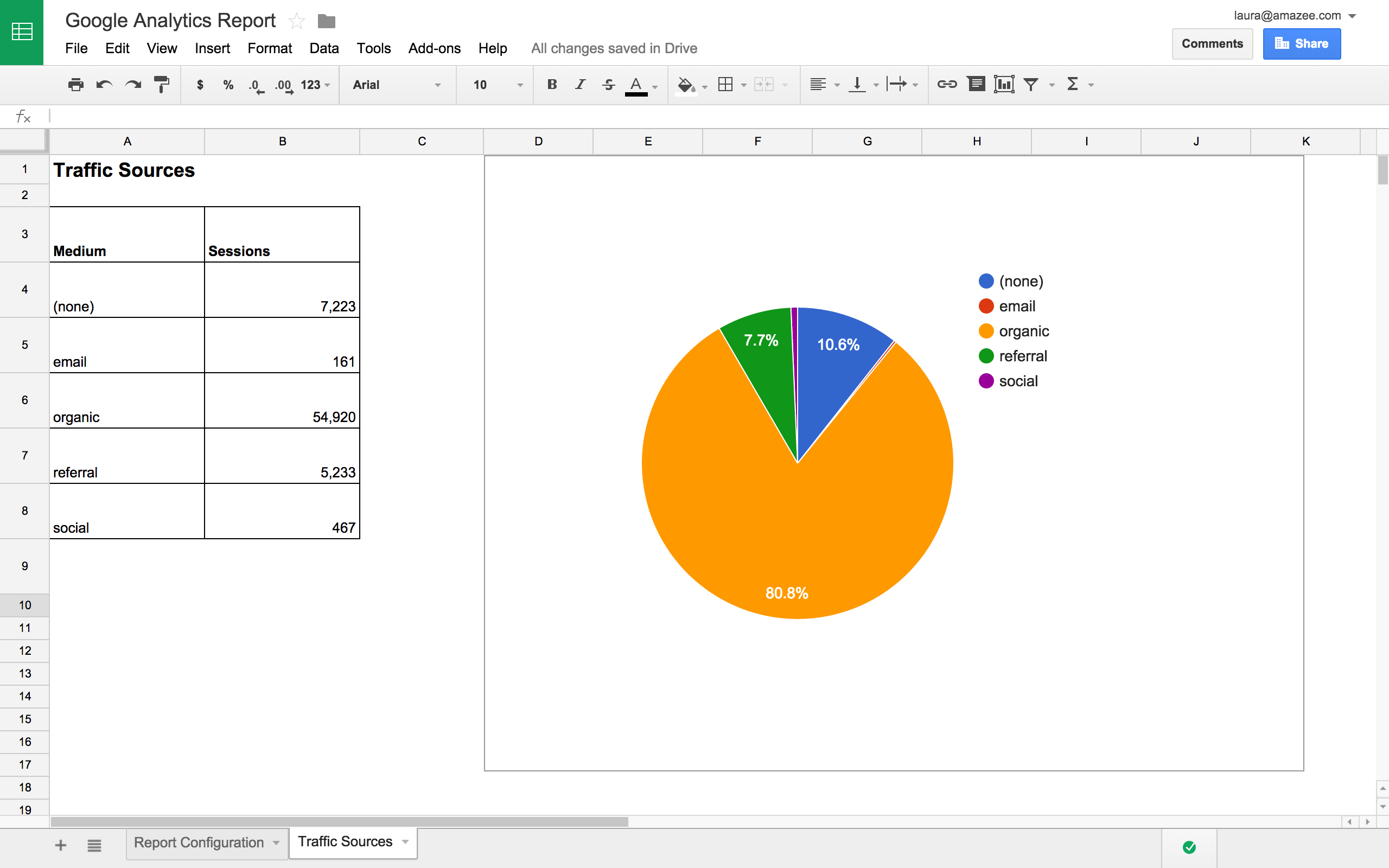
In 2013, we published How to Create Auto-Updated Google Analytics Reports in Google Docs. The process of creating Google Analytics reports in Google Sheets is now much more user-friendly, thanks to the official Google Analytics Add-on. This Add-on connects your Google Analytics accounts to Google Sheets, allowing you to automatically …
Setting Up Enhanced Ecommerce: A Step-by-Step Guide
In Enhanced Ecommerce in Google Analytics: An Introduction we explained what Enhanced Ecommerce is and detailed some of its advantages. This guide will give you an overview of how to set up Enhanced Ecommerce in three steps. Step 1: Enable Enhanced Ecommerce Features First, you need to enable Enhanced Ecommerce …
Google Tag Manager Tutorial Part 2: Tracking Downloads in GTM Version 2
An updated version of this blog post was published. In Part 1 of our updated Google Tag Manager Version 2 tutorial, we showed you how to track outbound links. If you have not already read it, please at least have a look at the introduction: all the requirements described apply here …
New Google Recommendations for AJAX Websites
Google Webmaster Central recently announced that Google was changing its recommendations for AJAX web pages. What do you need to do to ensure that your AJAX pages are crawlable? The good news is: nothing! Google’s bots are able to render Javascript and understand web pages like modern browsers do, even …
Google Tag Manager Tutorial Part 1: Tracking Outbound Links in GTM Version 2
An updated version of this blog post was published in March 2020. Last year we published a Google Tag Manager Guide to help you start using Google Tag Manager for event tracking. Since then, Google has upgraded all Google Tag Manager accounts to Version 2. This updated Google Tag Manager …